
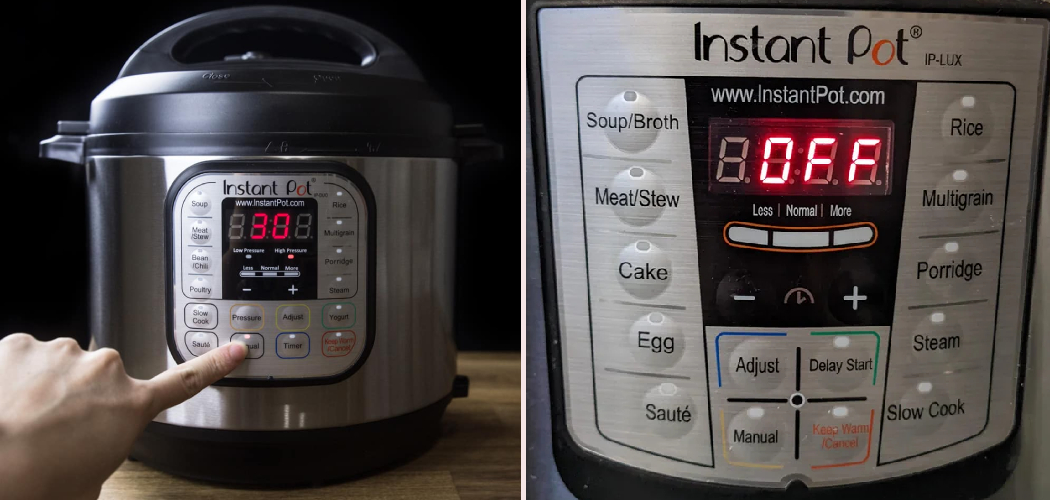
Your Instant Pot can do so much more than press one button and walk away. But if you’ve ever stared at that glowing control panel wondering which setting actually controls the heat, you’re not alone.
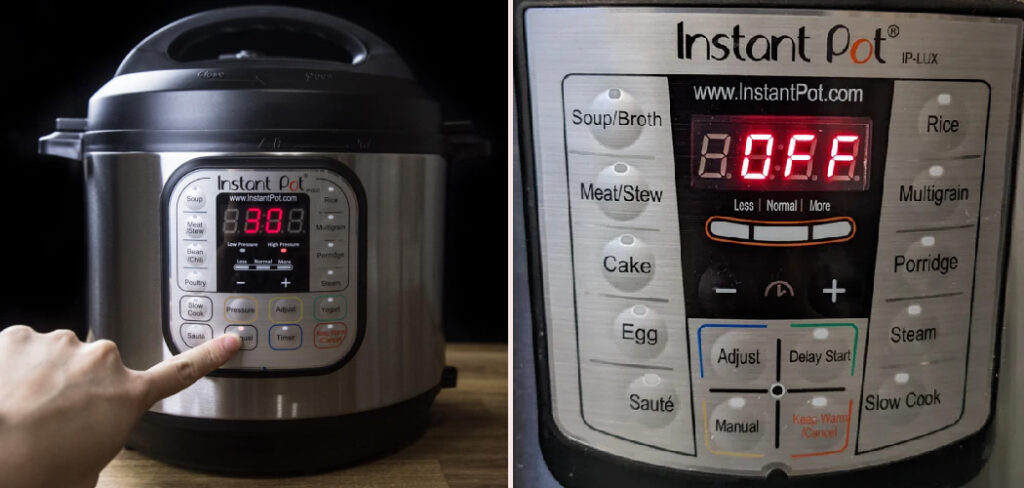
Here’s the good news. Once you understand how the buttons and presets work together, adjusting heat becomes second nature. You can sear, simmer, slow cook, or keep a meal warm without any guesswork.
Learning how to set temperature on Instant Pot gives you real control over every dish, from a gentle braise to a quick sauté. No more burnt bottoms or undercooked centers.
This guide walks you through every step, so you can dial in the right heat level with confidence and cook exactly what you want, exactly how you want it.
Why Learning to Set Temperature on an Instant Pot Matters
This skill pays off far beyond your home kitchen. Picture cooking in an RV where the stove is tiny and outlets are limited. One pot with adjustable heat handles searing, simmering, and slow cooking without crowding your space.
Cabin kitchens benefit too. When you’re working with minimal gear, controlled heating lets you prepare full meals using a single appliance.
Portable meal prep gets simpler when you can switch from the sauté function to pressure cooking in seconds. That flexibility matters most when stove access is limited or unreliable.
Temporary setups also feel safer. An electric pot with steady heat levels reduces the open-flame risks that come with camp stoves. You set the program, and the machine holds the heat for you. That kind of reliable, hands-off cooking makes healthy eating possible almost anywhere you travel.
Tools and Materials You’ll Need
You won’t need much to get started. Most of what you need comes with the pot, and the rest already lives in your kitchen.
Here’s what helps your first session go smoothly:
- Your Instant Pot with the inner pot seated correctly
- The sealing ring, clean and properly fitted
- A pair of heat-safe utensils for stirring during sauté
- An instant-read food thermometer to check doneness
- A trivet or steam rack for layered cooking
- A measuring cup for the liquid your recipe needs
- A clean, dry cloth for wiping the control panel
Optional but handy: a splatter guard or glass lid. It keeps your counter clean while you use the sauté function with the lid off.
Gather everything before you begin. Having your tools within reach keeps the whole process calm, especially when the heat is already building inside the pot.
Step-by-Step Guide on How to Set Temperature on Instant Pot
Step 1 – Set Up the Pot and Inner Pot
Start by placing your Instant Pot on a flat, dry counter with space around it for steam to escape. Lift out the inner pot, give it a quick check for residue, then seat it back inside the housing.
Press down gently and rotate it a touch so it sits flush against the heating element. A pot that isn’t seated evenly heats unevenly, and you’ll notice the difference in your food.
Plug in the unit, and watch the control panel light up. That soft glow tells you the appliance is ready and waiting for your input.
Take a moment to scan the buttons. Knowing where your presets and adjust keys sit saves you fumbling once the cooking starts.
Step 2 – Choose Between Pressure and Non-Pressure Cooking
Before you touch any heat setting, decide how you want to cook. Pressure cooking, slow cooking, and sauté each use heat differently, so your choice shapes everything that follows.
For a quick sear or simmer, you’ll work with the lid off using the sauté function. For tenderizing tough cuts, pressure cooking with the lid sealed does the heavy lifting.
Learning how to set temperature on Instant Pot starts with matching the cooking program to your goal. A stew wants slow, steady warmth, while a stir-fry needs a fast, high heat level.
Picture your finished dish first. That mental image points you straight to the right program and saves you from second-guessing mid-recipe.
Step 3 – Use the Sauté Function for Direct Heat
Press the sauté button to control heat directly with the lid off. Most models let you cycle through low, medium, and high heat levels by tapping the adjust key or the sauté button again.
You’ll see the display panel shift as you change settings, and within a minute the inner pot warmth builds. Low works for gentle simmering, medium for softening onions, and high for a good sear.

Listen for that quiet sizzle when oil hits the hot surface. That sound tells you the pot has reached temperature and is ready for your ingredients.
Stir often, since the heat sits at the bottom. Adjusting between levels as you go keeps delicate foods from scorching while still giving you that golden, flavorful finish.
Step 4 – Select a Preset or Manual Program
Once you’re done with direct heat, choose a preset or set things manually. Presets like Soup, Rice, or Meat carry built-in heat and time combinations, which makes them perfect when you’re still learning.
For more control, press the Manual or Pressure Cook button instead. This lets you skip the automatic settings and dial in your own cooking time, while the pot manages the internal heat for you.
The control panel shows your selection clearly, often with a small light beside the active program. Glance at it to confirm you picked the right one.
Presets remove guesswork, but manual settings give you room to grow. As your confidence builds, you’ll lean on manual mode for recipes that need a personal touch.
Step 5 – Adjust Pressure and Heat Levels
With pressure cooking, you control heat indirectly by choosing high or low pressure. Tap the pressure button to switch between them, and watch the display panel confirm your choice.
High pressure raises the internal temperature and cooks dense foods like beans or roasts faster. Low pressure suits delicate items such as eggs or fish that turn rubbery under too much heat.
You won’t see a number for the temperature here, since the pressure setting does the work behind the scenes. The pot regulates everything once it seals.
Match the pressure to your ingredient, and you’ll get tender results without overcooking. This quiet, automatic control is exactly why so many cooks trust the appliance for hands-off meals.
Step 6 – Seal the Lid and Position the Valve
Now place the lid on top and turn it until you hear a soft chime or click. That sound confirms the lid locked into place and is ready to build pressure.
Check the sealing ring is snug inside the lid, since a loose ring lets steam escape and stalls the cook. Then turn the steam release valve to the Sealing position.
You’ll hear silence at first as pressure builds, followed by a gentle hiss if any steam slips out. The float valve near the lid rises once full pressure is reached.
This sealed setup is what makes pressure cooking behavior so efficient. With the valve set right, the pot traps heat and cooks your meal evenly from every side.
Step 7 – Switch to Keep Warm Mode
When the cooking program finishes, the pot usually beeps and shifts into keep warm mode on its own. This setting holds your food at a safe serving temperature without continuing to cook it.
You’ll notice the display panel switch to a warming readout, often counting up the minutes since the cycle ended. The inner pot stays comfortably warm to the touch through the housing.
This mode is handy when dinner needs to wait for latecomers. It keeps soups, stews, and sauces ready without drying them out.
Just don’t leave food on warm for hours on end. Use it as a short buffer, then turn the unit off so your meal stays fresh and your dish keeps its best texture.
Step 8 – Release Steam and Check Food Temperature
Once cooking ends, release the steam before opening. For a quick release, carefully turn the steam release valve and stand back as a strong jet of steam shoots up with a loud hiss.
For delicate foods, let the pressure drop on its own through a natural release. The float valve sinks when it’s safe to open.
Lift the lid away from your face to avoid the rush of hot vapor. Then check your food with an instant-read thermometer, especially for meats that need a safe internal temperature.
Give it a gentle poke or stir to test the texture. If it needs more time, switch back to sauté or reseal and cook a little longer.
Critical Mistakes When Learning to Set Temperature on an Instant Pot
The most common slip is confusing the sauté heat levels. Many beginners leave the function on high while softening onions, then wonder why everything scorches. Tap the adjust key down to medium or low for gentle tasks, and save high heat for searing only.
Another frequent mistake is forgetting the steam release valve position. If you leave it on Venting when you mean to pressure cook, the pot never builds pressure and your food sits undercooked. Always confirm the valve sits on Sealing before you start a pressure program.
People also skip the liquid requirement. Pressure cooking needs enough liquid to create steam, and a dry pot triggers the burn warning fast. Check your recipe and add the minimum your model needs.
A fourth error is relying only on presets without understanding them. Presets are helpful, but each one assumes a certain food and quantity. When your dish differs, switch to manual settings and adjust the time yourself for better results.
Finally, many cooks leave food on keep warm mode for far too long. Extended warming dries out meals and dulls texture, so serve promptly or turn the unit off.

Expert Tips
Preheat the inner pot on sauté before adding oil for a better sear. A hot surface gives you that satisfying sizzle and prevents food from sticking.
Keep a spare sealing ring on hand, and store one for savory dishes and one for sweet ones. The ring absorbs odors, and a dedicated set keeps your desserts from tasting like last night’s curry.
When a recipe doesn’t list a heat level, start lower than you think. You can always raise it, but you can’t undo a burnt bottom.
Use the keep warm function as a short holding stage, not a cooking method. It maintains temperature beautifully for twenty to thirty minutes.
Lastly, wipe the control panel and rim after every use. A clean lid seals better and keeps your pressure cooker settings working exactly as they should.
Frequently Asked Questions
Can I set an exact temperature in degrees on my Instant Pot?
Most standard models don’t let you choose an exact number. Instead, you pick a heat level or pressure setting that the pot regulates for you:
- Sauté offers low, medium, and high heat
- Pressure cooking uses low or high pressure
- Slow cook holds a gentle, steady warmth
Newer models with sous vide programs do allow precise degree settings, so check your specific model’s manual.
Why isn’t my Instant Pot building pressure?
Several simple issues usually cause this. The steam release valve might sit on Venting instead of Sealing, or the sealing ring could be loose or missing. You may also need more liquid, since steam can’t build without it. Check the valve first, confirm the ring is seated, then add the minimum liquid your recipe requires. These quick checks solve most pressure problems fast.
How do I lower the heat when sautéing?
Press the sauté button again or tap the adjust key to cycle through the levels. The display panel shows your current setting, usually labeled low, medium, or high. Drop to low for simmering sauces and medium for softening vegetables. Reserve high for searing meat. Adjusting as you cook prevents scorching and gives you far more control over delicate ingredients.
Is keep warm mode safe to leave on overnight?
It’s not recommended. While keep warm mode holds food at a safe temperature for a few hours, leaving it overnight dries out your meal and dulls its texture. Food quality drops well before any safety concern. Use the function as a short buffer between cooking and serving, ideally under two hours, then refrigerate leftovers promptly to keep them fresh.
What’s the difference between high and low pressure?
High pressure raises the internal temperature and cooks dense foods faster, like beans, roasts, and root vegetables. Low pressure cooks at a gentler heat, which suits delicate items such as eggs, fish, and custards that overcook easily. Match the setting to your ingredient. When a recipe doesn’t specify, high pressure works for most hearty meals, while low pressure protects softer foods.
Conclusion
Getting confident with your pot comes down to a few simple habits. Seat the inner pot properly, decide whether you want direct sauté heat or sealed pressure cooking, and choose the program that matches your dish.
From there, the appliance does the hard work. Adjust your sauté levels for searing or simmering, pick high or low pressure for tender results, and let keep warm mode hold dinner until you’re ready to serve.
Once you understand how to set temperature on Instant Pot, every meal feels easier and more reliable. You’ll sear, braise, and slow cook with the same machine, all without crowding your kitchen or worrying about open flames.
So plug in your pot, scan that control panel, and start experimenting with the heat levels you’ve just learned. Each session builds your skill and your confidence. Before long, you’ll move between programs without a second thought, cooking everything from weeknight stews to special dinners like a true pro, no technician required.

About
Nick Hall has spent the last seven years working at the intersection of kitchen design and home repair — first as a design assistant at a residential renovation studio, then as a freelance writer covering everything from cabinet layouts to leaky faucet fixes.
Her approach is simple: kitchens should look good and function well. That means she’s just as comfortable talking about color palettes and counter materials as she is walking readers through how to fix a wobbly cabinet hinge or troubleshoot a garbage disposal.
Nick has worked directly with homeowners on small-space kitchen makeovers, budget-conscious renovations, and the kind of everyday repairs that don’t need a contractor — just the right instructions. She writes from experience, not theory, and tests most of the fixes and tips she shares before publishing them.
When she’s not writing, Nick is usually hunting for mid-century kitchen finds at estate sales or helping friends plan their own renovations. She lives in Columbus, Ohio.